This is a working checklist for Amazon India sellers for the 2026 Diwali sale. It is split into three phases: before the peak, during the sale and after the sale. Each step is something you can check in Seller Central or Amazon Ads today.
The dates first. Amazon India says the Great Indian Festival 2026 opened on 8 October 2026 (Prime members got early access). Diwali is on Sunday, 8 November 2026, with Dhanteras on 6 November. So the sale is already live, and the biggest gifting week is still ahead.
Looking for which tool to use for deals, FBA stock and clearance? That is covered in our best Amazon tool for Diwali sale guide. This page is the step-by-step checklist, with a bigger focus on ads, budgets and the post-sale money trail.
Diwali 2026 and Great Indian Festival 2026: key dates
| Event | Date | Status |
|---|---|---|
| Great Indian Festival 2026 opens (all customers) | 8 October 2026, 12 a.m. | Announced by Amazon India |
| Prime early access | 24 hours before the public start | Announced (reported by press) |
| Great Indian Festival 2026 end date | — | Not announced in Amazon press posts |
| Dhanteras | Friday, 6 November 2026 | Calendar date |
| Diwali (Lakshmi Puja) | Sunday, 8 November 2026 | Calendar date |
| Bhai Dooj | Wednesday, 11 November 2026 | Calendar date |
| FBA inbound cutoff for the event | — | Not published publicly; check Seller Central |
One more date that affects your margin: Amazon India raised closing fees from 7 September 2026 — by ₹1 for items priced up to ₹500 and by ₹3 for items above ₹500, across FC, Easy Ship and Seller Flex. If your deal prices were set on last year’s fees, re-check them.
Phase 1: Before the Diwali peak (now to Dhanteras)
The sale is live, but the Dhanteras-to-Diwali week is still to come. Use the time to fix stock, listings and offers before you spend more on ads.
1. Stock and FBA inbound
- List your hero SKUs. Take the 20–30 SKUs that sold most in last year’s festive weeks and in the last 30 days.
- Check days of cover. Sellable FBA units ÷ average daily units = days of cover. Use the festive daily rate, not the normal one.
- Ship now, split shipments. Amazon’s own Seller Central post for this event says to send inventory to fulfilment centres now and not wait until the last minute. It does not give a public cutoff date.
- Check capacity and IPI in your account. Your FBA capacity limits and inventory performance decide how much you can send. These are account-specific; read them in Seller Central before you book a truck.
- Do not send more of dead stock. SKUs with high FBA units and weak 30-day sales need a coupon or a removal, not another shipment.
- Look at where demand comes from. If most festive orders for a SKU go to a few states, check that stock sits in fulfilment centres that serve them.
ListingPilot’s Amazon sales tracker shows units per ASIN by day and state-wise sales, so you can see which states your festive orders actually ship to. For the Seller Central method, read how to find state-wise stock in Amazon.
2. Listings with gift keywords
- Add honest gifting terms where they fit the product: “Diwali gift”, “gift set”, “gift for family”, “corporate gift”, “festive gift hamper”. Put them in backend search terms or bullets, not stuffed into the title.
- Make sure the main image, title and price are correct on the child ASIN that actually sells.
- Check that MRP, net quantity and other Legal Metrology fields are filled — festive bulk edits often break them.
- Fix suppressed or inactive listings first. A deal or an ad on a hidden ASIN is wasted money.
ListingPilot gives every ASIN a listing quality score (LQS) from 0 to 100, so you can sort hero SKUs by the weakest listings and fix those first. It also tracks BSR and lets you benchmark your ASIN against competitor ASINs you choose. ListingPilot does not write your copy for you; the gift keywords are your call.
3. Deals and coupons
- Know the deal types on the storefront. Amazon India lists Blockbuster Deals, Top 100 Deals, Mega Deals and 8 PM Deals for this event, plus offers such as Buy More Save More and Amazon Combos.
- Check the fee before you submit. Amazon India does not publish a public festive deal rate card. The slot fee is shown in Seller Central at submission. Add it to the discount, referral fee and closing fee before you decide.
- Use coupons where you missed deal slots. A coupon still shows a badge in search results.
- Confirm deals are live, not just “submitted”. Check the deal state on the listing itself.
- Check price against MRP and last year. A deal price above last Diwali’s price looks fake to shoppers.
4. Ads setup before the peak
- Write down a break-even ACOS and a TACoS ceiling for each hero ASIN before you touch bids.
- Split festive campaigns (gift keywords, competitor terms) from your always-on campaigns so you can cool them down later.
- Plan budget increases for the peak days and decide in advance when they come back down.
- Make a list of ASINs that must never get extra ad spend: low stock, no deal, poor listing.
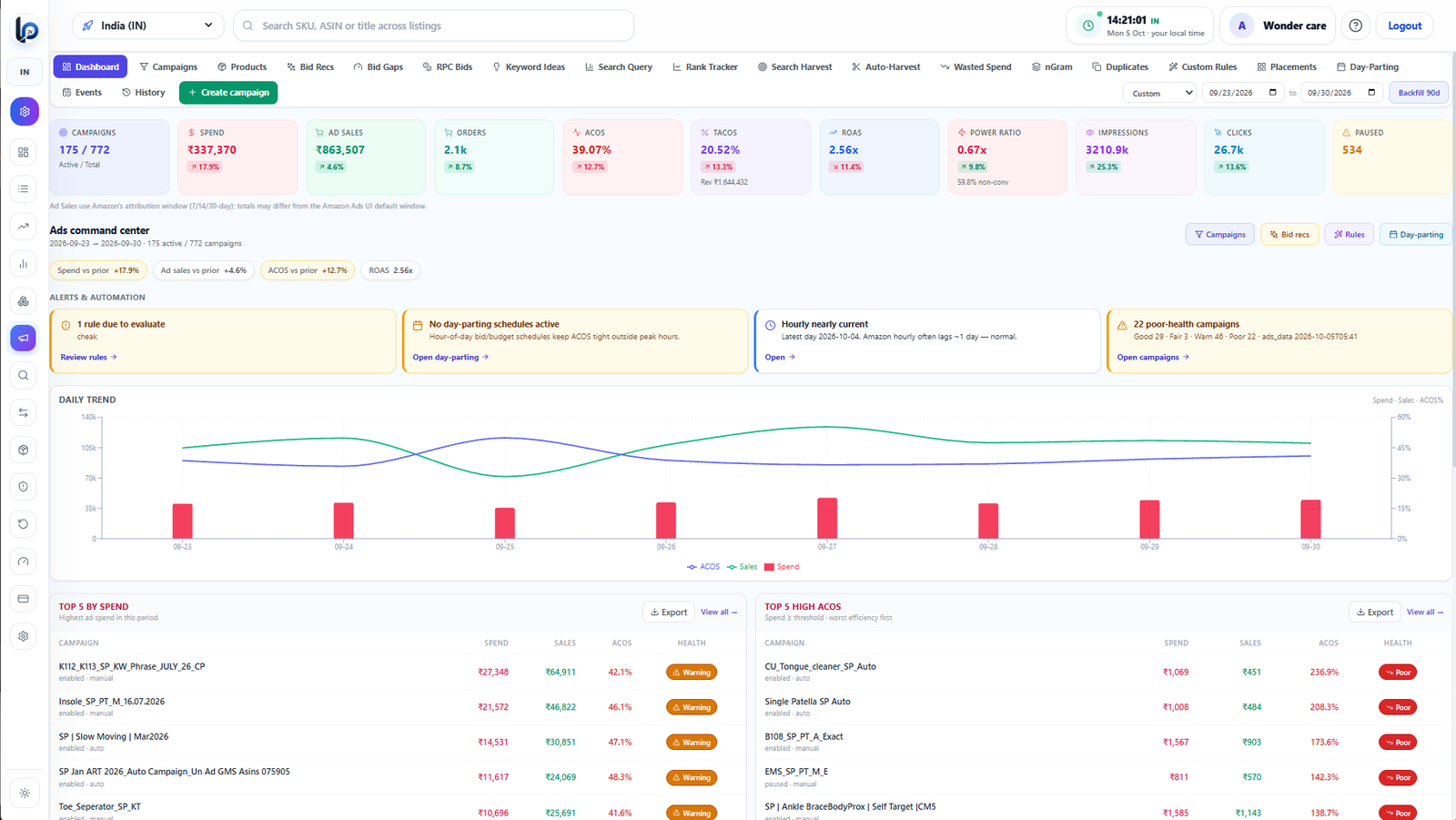
In ListingPilot’s Amazon ads automation tool, an event schedule raises budgets for a date window and reverts them on its own when the window ends. It is created switched off, so nothing changes until you turn it on.
Phase 2: During the sale
During the sale, check the same few numbers every morning and once in the evening. Most festive losses come from three things: budgets that run out early, ads on SKUs that are out of stock, and bids raised without a limit.
5. Bids and budgets
- Raise budgets before bids. More shoppers means more clicks at the same bid. A campaign that spends its whole budget by noon misses the evening.
- Cap every bid increase. Set a rupee ceiling per keyword so a rule or a late-night edit can’t push a bid to a loss.
- Move money to winners. Put extra budget on in-stock ASINs that carry a deal and sit under your ACOS target.
ListingPilot’s rules run through the Amazon Ads API. A rule can look at spend, sales, ACOS, ROAS, TACoS, clicks or budget used %, and change a bid or budget by a set amount with a hard cap on the result. Every change is logged, and you can roll a change back from the history page.
6. Dayparting
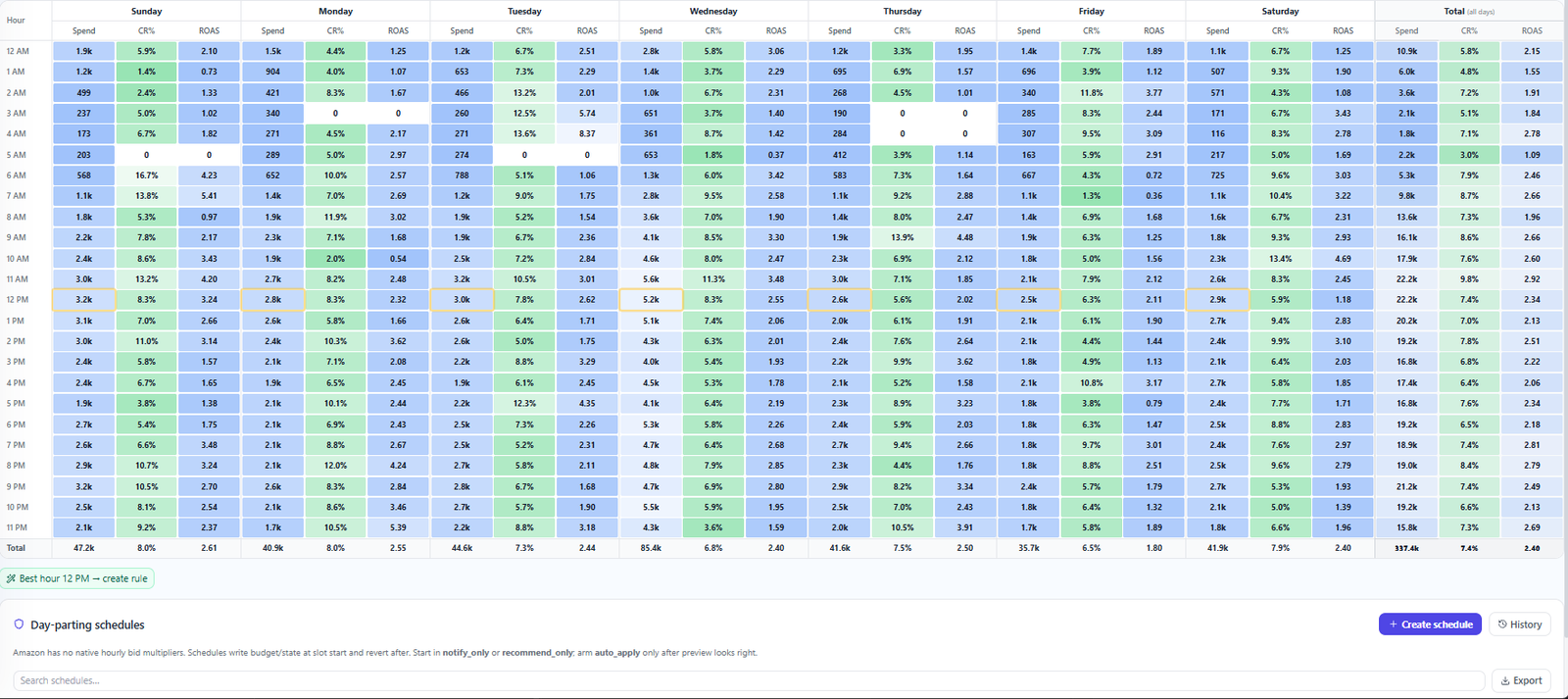
Festive shoppers do not buy evenly through the day. Look at orders and ACOS by hour for your own account, then lower bids in hours that only burn clicks and keep full bids in hours that convert. Re-check after the first week; festive patterns can differ from normal weeks.
7. Budget-out and stock-out checks
- Twice a day, find campaigns that used 80% or more of their daily budget before the evening.
- Pause or cut ads on any ASIN that is out of stock or about to be. Ads on an out-of-stock ASIN waste money and cannot convert.
- Watch for a sudden drop in an ASIN’s sales — it is often a lost Buy Box, a suppressed listing or an expired deal.
In ListingPilot you can set a rule on budget used % so that a winning campaign gets more budget (up to a cap you set) instead of going dark. The sales tracker flags ASINs whose sales dropped against the previous period, so a broken listing or lost deal shows up the same day.
8. Watch ACOS and TACoS together
ACOS = ad spend ÷ ad sales. TACoS = ad spend ÷ total sales (ads plus organic). In the sale, ACOS tells you if a campaign is efficient today. TACoS tells you if ads are lifting your whole business. A rising ACOS with a falling TACoS can be fine; both rising means you are paying more for the same total sales. Read the full ACOS vs TACoS guide for the formulas and a ₹ example.
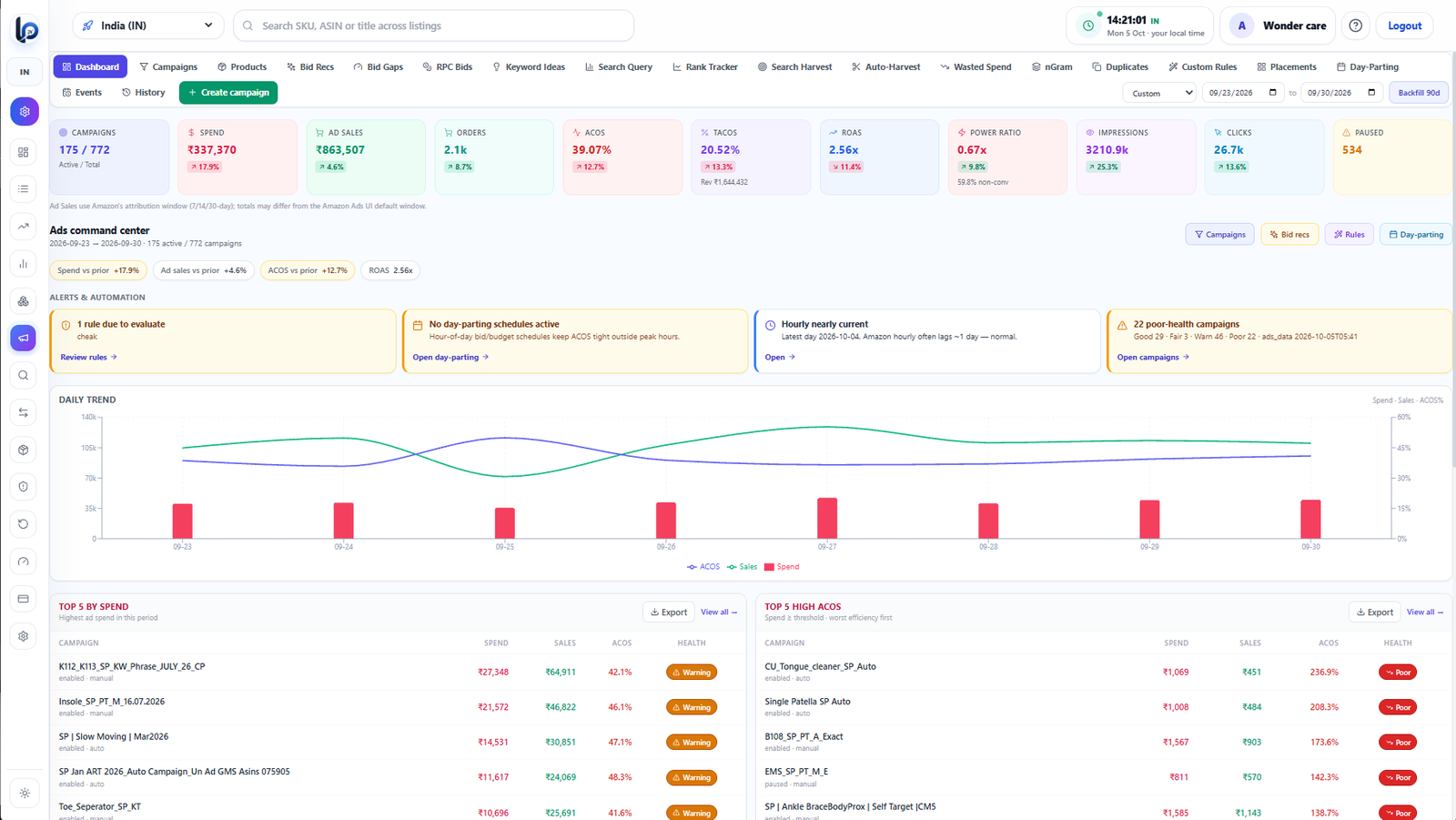
ListingPilot’s TACoS tracker joins Ads API spend with SP-API total sales and shows organic vs sponsored sales per ASIN. The Amazon PPC dashboard puts campaign ACOS, ROAS and wasted search-term spend on one screen.
| Check | What to look for | Action |
|---|---|---|
| Budget used % | Campaigns near 80%+ before evening | Raise budget on winners, with a cap |
| Stock | Hero ASINs with low days of cover | Pause ads, slow the deal, plan restock |
| Deal / coupon state | Deals that ended or never went live | Fix the offer before adding ad spend |
| Sales drop | ASINs selling far below yesterday | Check Buy Box, suppression, price |
| ACOS vs target | Campaigns well above break-even with enough clicks | Lower bids or add negatives |
| TACoS trend | Rising for 3+ days with flat total sales | Shift spend to ASINs that grow organic |
Phase 3: After the sale
9. Returns spike
Returns usually rise for a few weeks after a big sale, especially in fashion and electronics. Track return rate per ASIN for 2–4 weeks. A SKU with a sharp jump in returns needs a look at its size chart, images or description before next season. Check that returned FBA units come back as sellable or get flagged for removal.
10. Settlement and payout timing
Amazon India says sellers are eligible to be paid for an order 7 days after it is delivered, with payouts every 7 days and faster cycles for eligible sellers. Festive orders that ship late or get returned push cash further out. Plan your stock payments around this, not around the order date.
11. Reconcile every settlement
- Match each settlement to orders, refunds, and fee lines (referral, closing, FBA, deal and ad charges).
- Check the new closing fee (from 7 September 2026) is what you expected on your price bands.
- Flag orders with no payout or an unexpected deduction and raise them with Seller Support.
ListingPilot’s Amazon settlement reconciliation matches payouts to orders so you can find gaps after the sale without building the sheet by hand.
12. Post-festive bid cooldown
- Bring budgets back down in steps over a week, not in one cut, so you don’t lose rank overnight.
- Lower or pause gift-only keywords (“Diwali gift”) once Bhai Dooj has passed.
- Keep spend on terms that also sell in normal weeks.
- Compare TACoS for the four weeks after the sale with the four weeks before it.
Diwali sale ke liye seller checklist (Hinglish)
- Great Indian Festival 2026 8 October se live hai, aur Diwali 8 November 2026 (Sunday) ko hai.
- Hero SKU ka FBA stock abhi check karo; inbound cutoff apne Seller Central mein dekho.
- Deal ya coupon listing par live hai ya nahi, yeh confirm karo — sirf submit karna kaafi nahi.
- Pehle budget badhao, phir bid; har bid increase par limit (cap) lagao.
- Out-of-stock ASIN par ads turant pause karo, aur ACOS ke saath TACoS bhi dekho.
- Sale ke baad returns, settlement aur payout ko orders se match karo, aur bids dheere-dheere kam karo.
Where ListingPilot fits in this checklist
ListingPilot (we build it) is an Amazon-only seller dashboard. It does not cover Flipkart or other marketplaces, it does not write listing copy with AI, and it does not show sessions or page conversion data. For this checklist it covers:
- Ads API rules with change caps, dayparting, event schedules that auto-revert, and rollback from the change log.
- ACOS, ROAS and TACoS, plus organic vs sponsored sales per ASIN.
- Daily sales per ASIN, sales drop alerts and state-wise sales.
- Listing quality score (0–100), BSR tracking and competitor benchmarking.
- Settlement reconciliation after the sale.
See ListingPilot pricing for plans in INR. For a daily ads routine outside the festive season, read the Amazon PPC dashboard guide.
FAQs
When is the Amazon Great Indian Festival 2026?
When is Diwali 2026?
What is the FBA inbound deadline for the Diwali sale on Amazon India?
How much do Lightning Deals cost on Amazon.in during the festive sale?
Should I raise Amazon ad bids during the Diwali sale?
What is a good TACoS during the Diwali sale?
When will I get paid for Diwali sale orders on Amazon India?
What should I do after the Diwali sale ends on Amazon?
Sources
- About Amazon India — Great Indian Festival 2026 opens 8 October
- About Amazon India — Great Indian Festival 2026 is live (deal types)
- Amazon Seller Central India forum — “Great Indian Festival Starts Oct 8 — Get Ready Now!”
- Sell on Amazon India — fees and pricing (closing fees from 7 Sep 2026; 7-day payment eligibility)
- Hindustan Times — Great Indian Festival 2026 dates and Prime early access
- Diwali 2026 calendar — Dhanteras 6 Nov, Diwali 8 Nov, Bhai Dooj 11 Nov